Bank Lab
In this lab, we will learn about object oriented programming through the framework of a banking system.
Object oriented programming
Object oriented programming uses classes of objects to group related properties and functionalities.
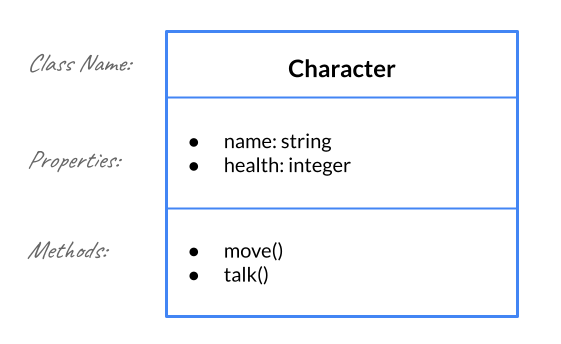
Let’s consider a video game character. Our character will have a name and a health property and be able to perform a move() action and a talk() action.
This can be visualized by drawing a model. The model consists of the class name, the properties and their data type, and the methods with their arguments.
Suppose we want our character to be able to engage in combat. In that case, we will add a weapon property and a attack() action.
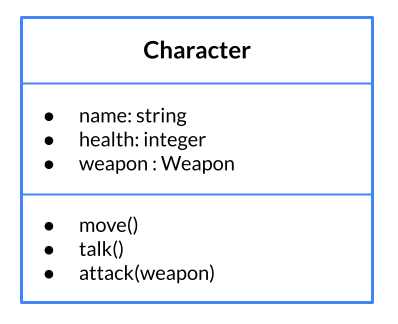
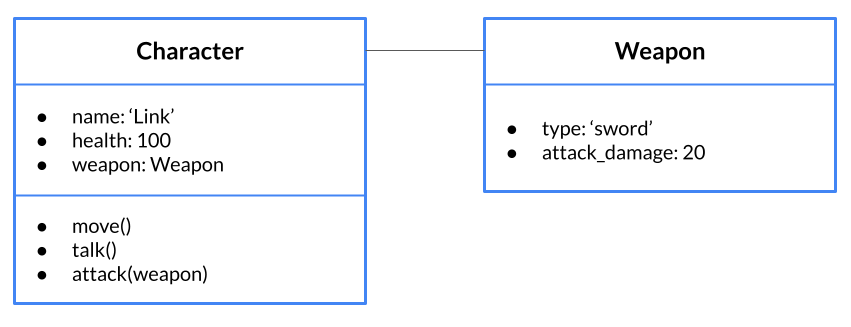
As you can see in the diagram above, the weapon property will take a data type Weapon. This is because we will create a new class to describe the properties and functionalities of Weapon. The objects Character and Weapon have an association with each other.

Now that we have a model for our Character and Weapon objects, we can imagine an instance of these objects with specific attributes.
To learn about how classes are implemented in Python, check out the resources below. At the very least, watch the videos in each section:
- 12.1 Why learn about classes?
- 12.2 Defining and Creating Simple Classes
- 12.3 Adding Methods to Classes
Setup
💻 In your cs9 directory, create a unit_02 directory and clone the lab-bank repository inside it.
cd cs9/unit_02
git clone https://github.com/the-isf-academy/lab-bank-YOUR-GITHUB-USERNAME.git
Understanding the Bank and Account Classes
You have been hired by the Bank of ISF (BISF) to review their accounting system. You goal is to improve their current system and improve the bank’s security.
💻 Let’s start by running central.py to learn how the banking system works.
This will execute a series of transactions depositing and withdrawing money from banks. Note that both the Bank and the Account objects report back what’s going on. Let’s try to figure out what’s happening.
💻 Open all the files in this directory using atom .
There’s a lot going on here! Fortunately, BISF has done a great job documenting their banking program with these documentation pages.
💻 Watch this video for an example about how to read documentation and use it to make a program:
✅ CHECKPOINT:
Answer the following check-in questions on your group’s Google doc before moving on:
- Describe what is happening in
central.py.- Create a model of the
BankandAccountobjectsNote that in
bank.py, theBankclass imports theAccountclass. This is because eachBankobject usesAccountobjects to store information about each account in the bank. It is very common for objects to contain other objects. When dealing with multiple classes, mapping how each of the parts interact can be a good to help understand what’s going on.
Dueling Bank Promotions
Let’s put your new understanding of the BISF banking system classes to the test.
💻 In promotion.py, use the Bank class to create the scenario described below:
- The bank HSBC opens and runs a promotion: for each of the first 10 people to open an account, HSBC will automatically deposit 10 times the account number into the account (so Account0 get $0, Account1 gets $10, Account2 gets $20…)
- 10 people open accounts (with the name
"Account0","Account1","Account2", …"Account9"). When each account opens, HSBC automatically deposits the promotion money - BISF opens and runs a counter promotion: For each of the first 10 new accounts, BISF will match the first deposit into each account (deposit the value again).
- Seeing an opportunity to make money, each of the 10 people who initially opened an account at HSBC:
- checks their HSBC account balance
- withdraws the full amount
- opens a BISF account (with the same name as their HSBC account)
- deposits their money.
- gets the BISF promotional matching deposit (as a separate transaction).
💻 Run python test_lab.py -k promotion to test this part of the lab.
👾 💬 FYI
In this lab we have included a testing script. The testing script for this lab is in the file
test_lab.py. Each test checks your output with the expected output. If your output is as expected, your program will successfully pass the test and'OK'will be output to the terminal.Note: the test harness checks both the end state and the logs from the banking operations so it is important that you follow the scenario in order.
Hint: If you get stuck, try looking through through
test_output.txtto make sure your output aligns with the expected output.
Transferring Money
To improve the functionality of their banking system, BISF wants you to implement a transfer() function at the end of the Bank class. BISF has already defined this function in the banking system’s documentation. Check out the documentation to see the specifics of the function you should implement.
✏️ Add the transfer() function to the model in your Google Doc. Be sure to refer to the documentation for the parameters.
💻 Write the transfer() function and test it by running python test_lab.py -k transfer.
Note: you may find it helpful to reuse functions that have already been implemented in the Bank or Account class
Hint: The test script uses different scenarios to check to make sure your function handles a variety of interactions. If you get stuck, read through the scenarios printed when you first run the test script to make sure your function is behaving normally.
Deliverables
For this lab, you should submit the following…
lab-bankrepository containing the following:- bank.py
- promotion.py
- Your Google Doc with responses to the checkpoint questions
Extension: Hacking the Bank
Now that you are familiar with the banking system, it’s time to get to work trying to hack the system 💰💰💰
There is a security bug somewhere in the banking program which allows users to get more money than they should.
💻 Your job is to find the bug and fix it. Run python test_lab.py -k bug to check your work.
Hint: If you don’t know where to start looking for the bug, the test scenario could be a good place to start. 🔎